This vignette benchmarks {duckspatial} against {sf} across several spatial operations, comparing computation time and memory usage as dataset size grows. We plan to extend it with additional operation types in future releases.
The benchmark code below is not evaluated when the vignette is built: it takes too long. Instead, it is run locally once before each release, and the results are stored in vignettes/data/bench-results.csv, which is what every number and figure in this document is generated from.
Results shown here were produced on 2026-10-09 with:
duckspatial: v1.2.1.9000
duckdb: v1.5.6
sf: v1.1.3
TL;DR
{duckspatial} is substantially faster and allocates far less memory than {sf} in almost all cases, with the advantage becoming more pronounced on larger datasets. The one exception is pairwise distance calculation, where the gap in computation time narrows considerably.
Prepare data
We are going to test the speed of a bunch of functions using simulated data. We use the make_points() function to generate n random points within the globe, and 10,000 random rectangles.
Set-up
# Load necessary packages
library(duckspatial)
library(bench)
library(dplyr)
library(sf)
library(ggplot2)
options(scipen = 999)

# Function to generate random points
make_points <- function(n_points) {
    points_df <- data.frame(
      id = 1:n_points,
      x = runif(n_points, min = -180, max = 180),
      y = runif(n_points, min = -90, max = 90),
      value = rnorm(n_points, mean = 100, sd = 15),
      category = sample(c("A", "B", "C", "D"), n_points, replace = TRUE)
  ) |>
    sf::st_as_sf(coords = c("x", "y"), crs = 4326)
}

# Turn a bench::mark() result into plain, CSV-friendly columns:
#  - median    : seconds   (numeric)
#  - mem_alloc : bytes     (numeric)
bench_tidy <- function(bm, op, n) {
  data.frame(
    op        = op,
    n         = n,
    pkg       = bm$pkg,
    median    = as.numeric(bm$median),
    min       = as.numeric(bm$min),
    mem_alloc = as.numeric(bm$mem_alloc),
    n_itr     = bm$n_itr,
    stringsAsFactors = FALSE
  )
}

# Generate datasets of different sizes
withr::with_seed(27, {
  points_sf_100k <- make_points(1e5)
  points_sf_1mi  <- make_points(1e6)
  points_sf_3mi  <- make_points(3e6)
})

# Generate polygons
# Create large polygon dataset (e.g., administrative regions, zones, etc.)
n_polygons <- 10000
polygons_list <- vector("list", n_polygons)

for(i in 1:n_polygons) {
  # Random center point with buffer from edges
  center_x <- runif(1, min = -170, max = 170)
  center_y <- runif(1, min = -80, max = 80)

  # Create simple rectangular polygons to avoid geometry issues
  width <- runif(1, min = 0.5, max = 3)
  height <- runif(1, min = 0.5, max = 3)

  # Create rectangle coordinates (must be closed: first point = last point)
  x_coords <- c(
    center_x - width/2,
    center_x + width/2,
    center_x + width/2,
    center_x - width/2,
    center_x - width/2  # Close the polygon
  )

  y_coords <- c(
    center_y - height/2,
    center_y - height/2,
    center_y + height/2,
    center_y + height/2,
    center_y - height/2  # Close the polygon
  )

  # Create polygon matrix
  coords <- cbind(x_coords, y_coords)

  # Create polygon (wrapped in list as required by st_polygon)
  polygons_list[[i]] <- st_polygon(list(coords))
}

polygons_sf <- st_sf(
  poly_id    = 1:n_polygons,
  region     = sample(c("North", "South", "East", "West"), n_polygons, replace = TRUE),
  population = sample(1000:1000000, n_polygons, replace = TRUE),
  geometry   = st_sfc(polygons_list, crs = 4326)
)
Spatial join
The spatial join aims to bring the attributes of a dataset to another dataset based on a spatial predicate. One example would be to have an x dataset with points that represent observations of wolves. In a y dataset, we could have polygons with attributes describing the geographical location (e.g. the name of the country, the name of the region). So, by using a ST_Join(x, y, "intersects"), we would assign the attributes of y to x according to where the observation of the wolf falls.
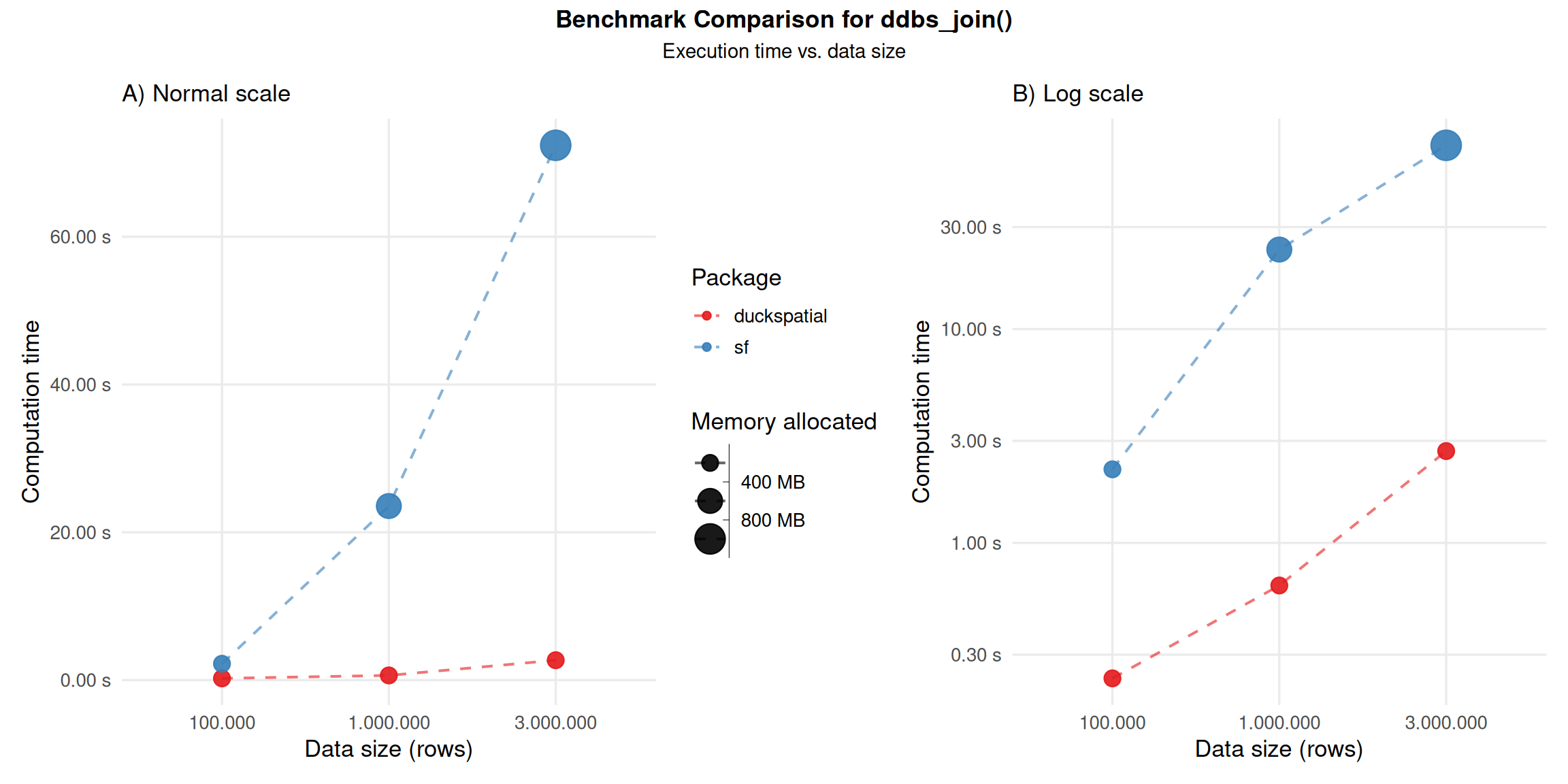
This operation can be intensive. In the current version of {duckspatial} we see an improvement in speed and memory usage in bigger datasets, as shown in Figure 1.
Using 1 million points: {duckspatial} was about 37 times faster than {sf}, and allocated 16 times less memory.
Using 3 million points: {duckspatial} was about 27 times faster than {sf}, and allocated 16 times less memory.
Benchmark code - ddbs_join
# Helper to run the benchmark
run_join_benchmark <- function(points_sf) {
  temp <- bench::mark(
    iterations  = 3,
    check       = FALSE,
    duckspatial = ddbs_join(points_sf, polygons_sf, join = "within"),
    sf          = st_join(points_sf, polygons_sf, join = st_within)
  )
  temp$pkg <- c("duckspatial", "sf")
  bench_tidy(temp, op = "join", n = nrow(points_sf))
}

# Run the benchmark
df_bench_join <- lapply(
  X   = list(points_sf_100k, points_sf_1mi, points_sf_3mi),
  FUN = run_join_benchmark
) |>
  dplyr::bind_rows()
Spatial filter
The spatial filter aims to filter rows of x based on a spatial relationship with y. For example, let’s imagine that we have an x dataset with observations of wolves all around the world, and we want to filter only those that are in a specific country, for instance in Spain. If the dataset has this attribute, we can just do it with a simple dplyr::filter(), but, if the wolves dataset doesn’t include a column with the country, we can use a spatial filter. For that, we need a second dataset y with the boundaries of Spain, and by using ST_Filter(x, y, "intersects"), we would filter only those wolf observations that intersect with Spain’s polygon.
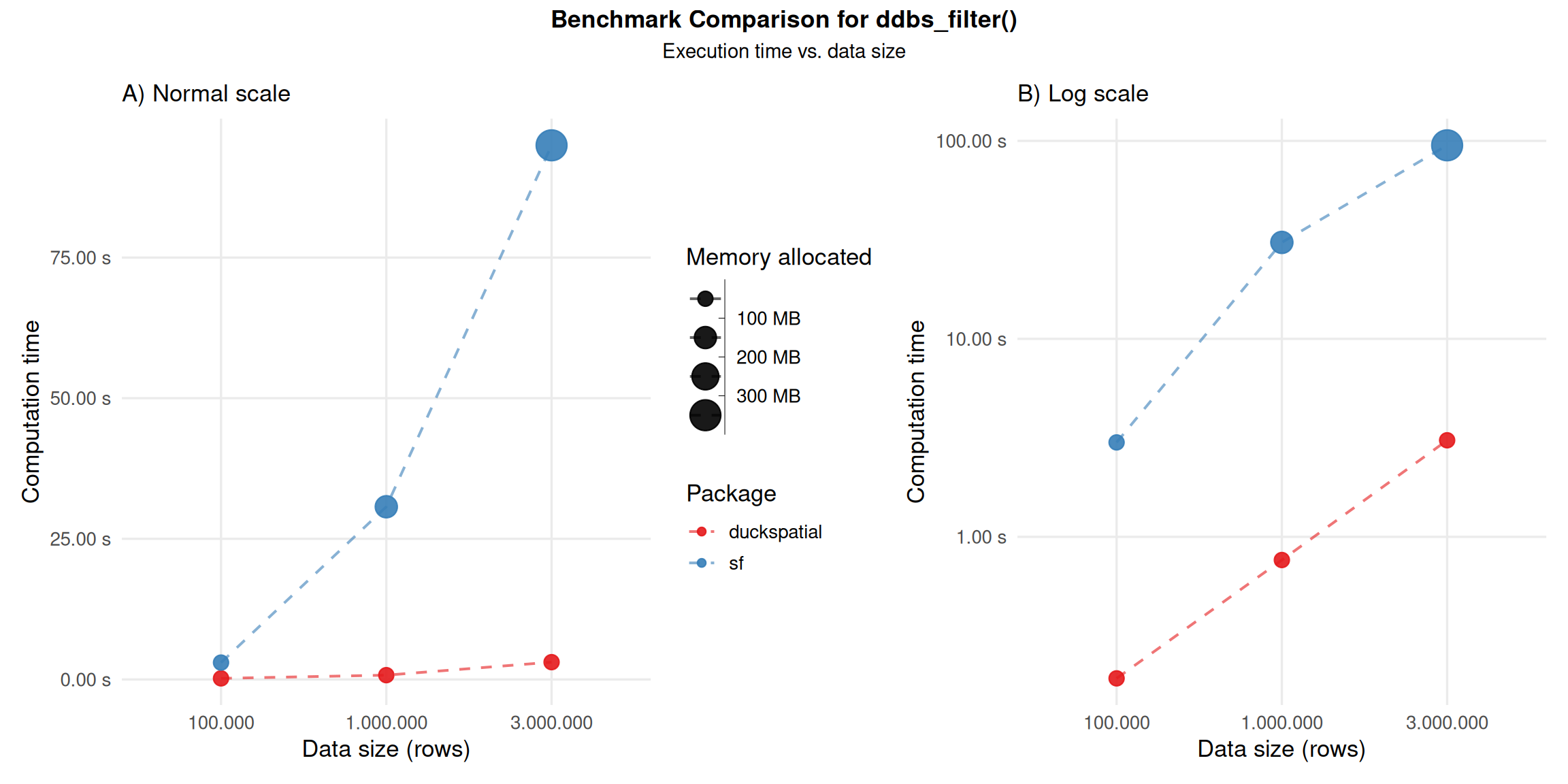
In the current version of {duckspatial} we see an improvement in speed and memory usage in bigger datasets, as shown in Figure 2.
Using 1 million points: {duckspatial} was about 40 times faster than {sf}, and allocated 4.9 times less memory.
Using 3 million points: {duckspatial} was about 31 times faster than {sf}, and allocated 5.3 times less memory.
Benchmark code - ddbs_filter
# Helper to run the benchmark
run_filter_benchmark <- function(points_sf) {
  temp <- bench::mark(
    iterations  = 3,
    check       = FALSE,
    duckspatial = ddbs_filter(points_sf, polygons_sf),
    sf          = st_filter(points_sf, polygons_sf)
  )
  temp$pkg <- c("duckspatial", "sf")
  bench_tidy(temp, op = "filter", n = nrow(points_sf))
}

# Run the benchmark
df_bench_filter <- lapply(
  X   = list(points_sf_100k, points_sf_1mi, points_sf_3mi),
  FUN = run_filter_benchmark
) |>
  dplyr::bind_rows()
Spatial distances
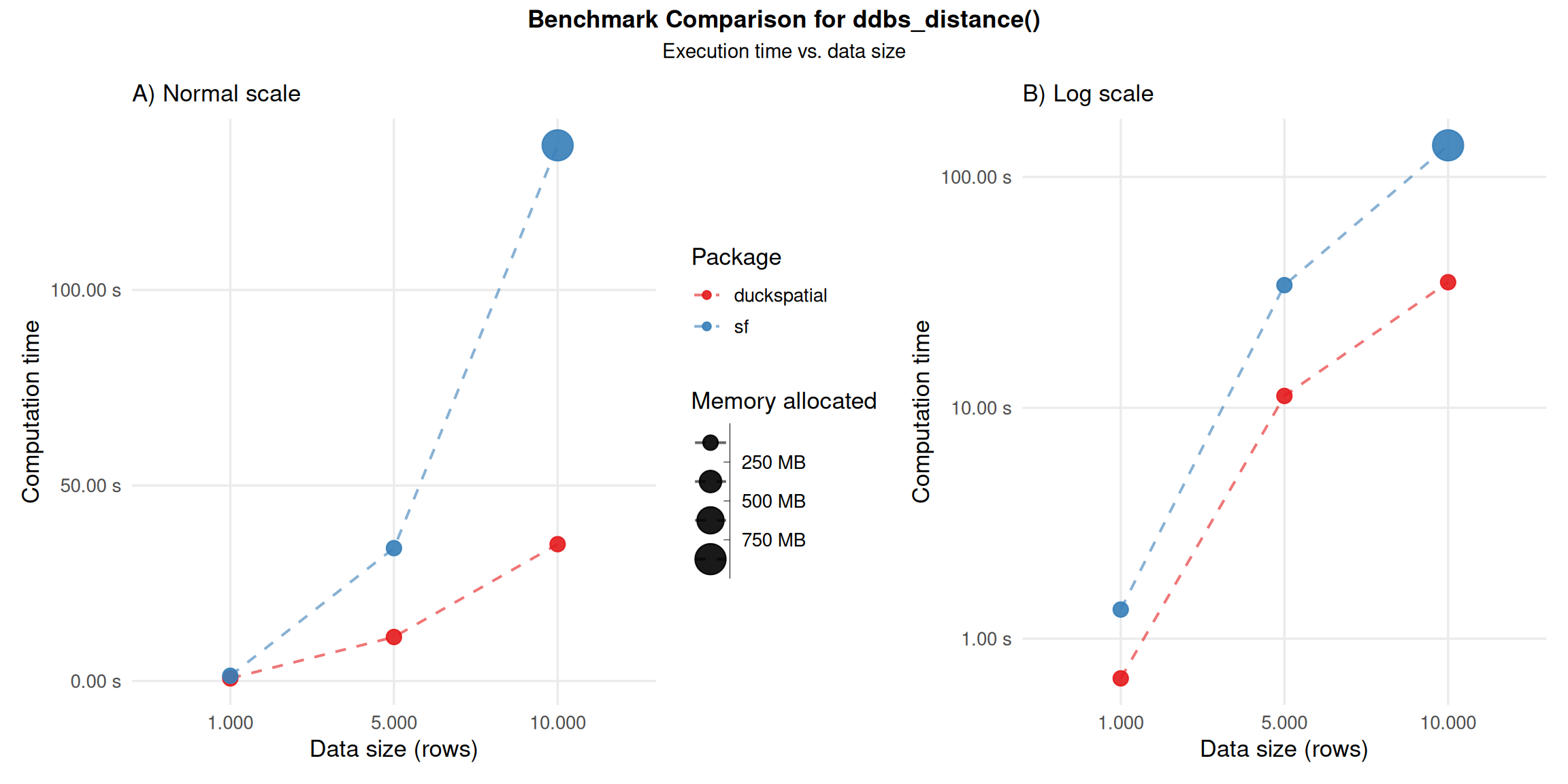
The ST_Distance(x, y) calculates the distance between each observation in x against each observation in y. The default {duckspatial} mode will return a lazy table with three columns: (id_x) the id of the row in x; (id_y) the id of the row in y; (distance) the actual distance between those pairs of observations. In the case of mode = 'sf', the result will be a sparse matrix. Note that {duckspatial} will use by default the best distance for the input CRS and geometry type.
- Using 10,000 pairs of points: {duckspatial} was about 3.9 times faster than {sf}, and allocated 141 times less memory.
Benchmark code - ddbs_distance
# Helper to run the benchmark
run_distance_benchmark <- function(n) {

  points_sf <- withr::with_seed(27, make_points(n))

  temp <- bench::mark(
    iterations  = 1,
    check       = FALSE,
    duckspatial = ddbs_distance(points_sf, points_sf),
    sf          = st_distance(points_sf, points_sf)
  )
  temp$pkg <- c("duckspatial", "sf")
  bench_tidy(temp, op = "distance", n = n)
}

df_bench_distance <- lapply(
  X   = c(1000, 5000, 10000),
  FUN = run_distance_benchmark
) |>
  dplyr::bind_rows()
Dissolving geometries
Dissolving geometries consists in merging/aggregating geometries that share a common attribute into a single geometry per group.
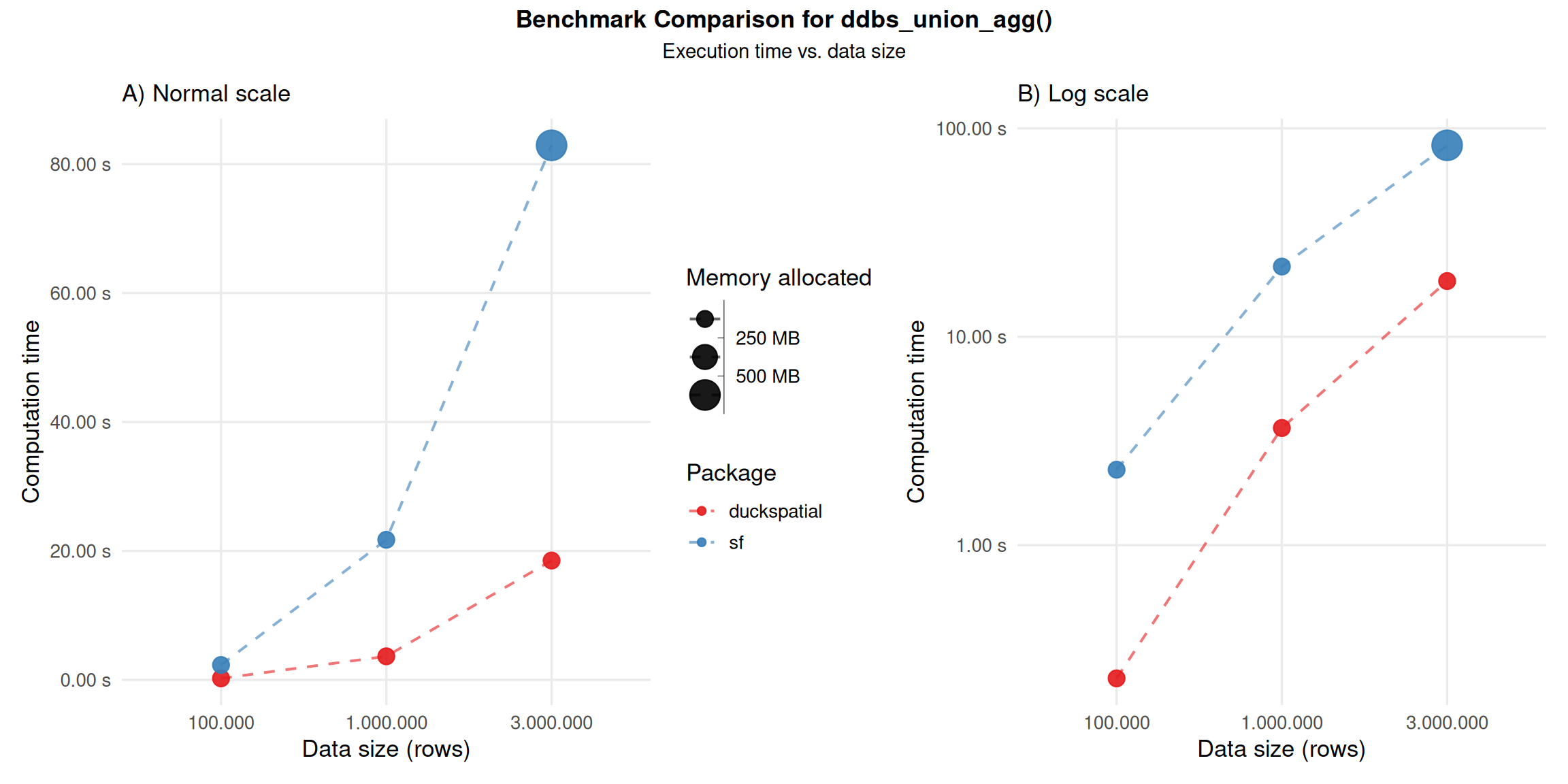
In the current version of {duckspatial} we see an improvement in speed and memory usage in bigger datasets, as shown in Figure 4.
Using 1 million points: {duckspatial} was about 6 times faster than {sf}, and allocated 9.5 times less memory.
Using 3 million points: {duckspatial} was about 4.5 times faster than {sf}, and allocated 9.8 times less memory.
Benchmark code - ddbs_union_agg
# Helper to run the benchmark
run_union_benchmark <- function(points_sf) {
  temp <- bench::mark(
    iterations  = 3,
    check       = FALSE,
    duckspatial = ddbs_union_agg(points_sf, by = "category"),
    sf          = points_sf |>
      group_by(category) |>
      summarise(geometry = st_union(geometry))
  )
  temp$pkg <- c("duckspatial", "sf")
  bench_tidy(temp, op = "union_agg", n = nrow(points_sf))
}

# Run the benchmark
df_bench_union <- lapply(
  X   = list(points_sf_100k, points_sf_1mi, points_sf_3mi),
  FUN = run_union_benchmark
) |>
  dplyr::bind_rows()
Geometry predicates
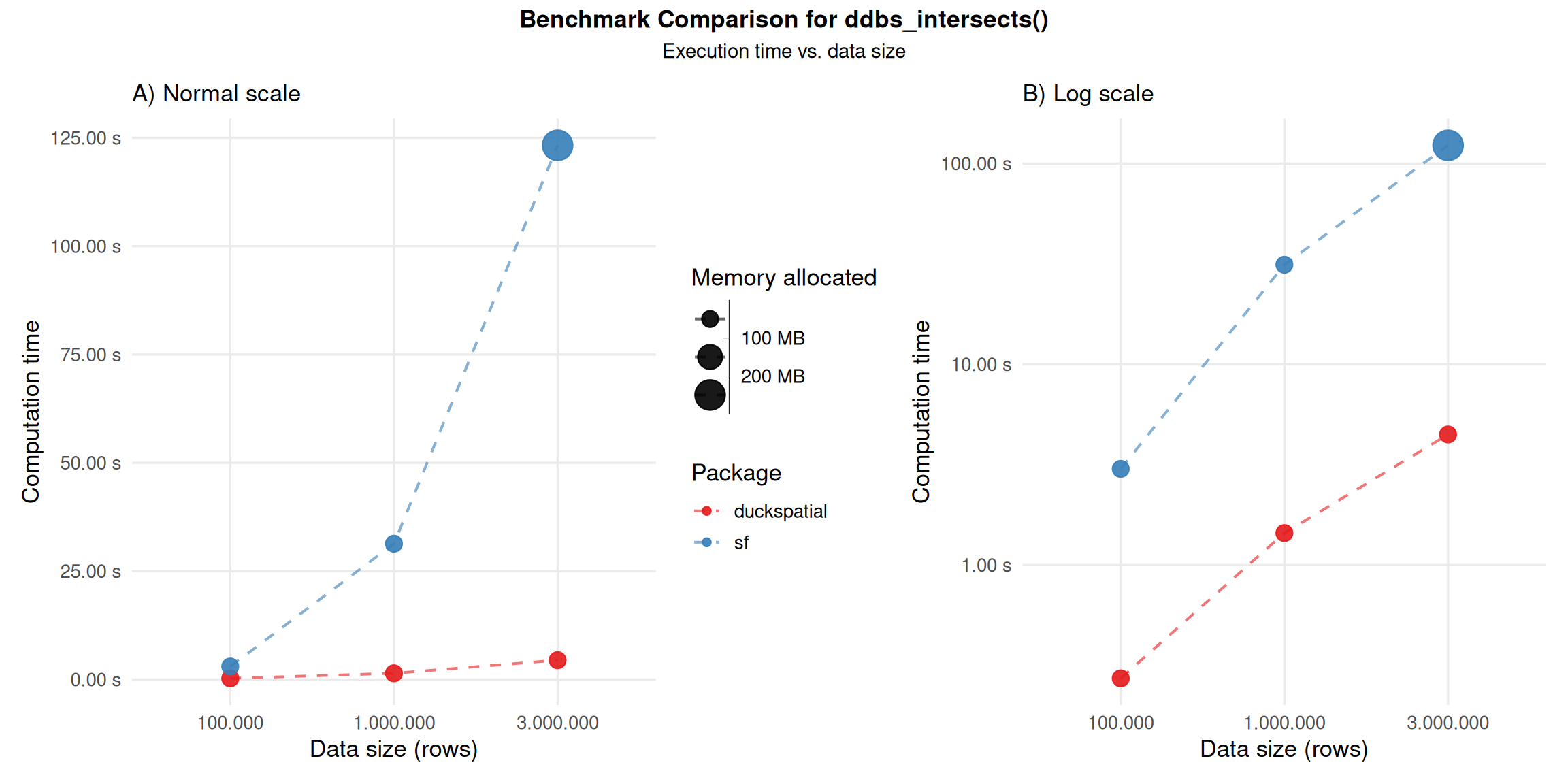
Geometry predicates are boolean functions that test spatial relationships between two geometries (they return true or false). They’re fundamental to spatial queries, letting you filter or join data based on how geometries relate to one another in space. Common examples include: ST_Contains, ST_Within, ST_Touches, ST_Overlaps, ST_Crosses, ST_Disjoint, and ST_Equals.
In the following example, we compare ST_Intersects(geometry A, geometry B), which returns true if the two geometries share any point in common (their interiors or boundaries overlap in any way).
Using 1 million points: {duckspatial} was about 22 times faster than {sf}, and allocated 2.9 times less memory.
Using 3 million points: {duckspatial} was about 28 times faster than {sf}, and allocated 3.1 times less memory.
Benchmark code - ddbs_intersects
# Helper to run the benchmark
run_predicate_benchmark <- function(points_sf) {
  temp <- bench::mark(
    iterations  = 1,
    check       = FALSE,
    duckspatial = ddbs_intersects(points_sf, polygons_sf),
    sf          = st_intersects(points_sf, polygons_sf)
  )
  temp$pkg <- c("duckspatial", "sf")
  bench_tidy(temp, op = "intersects", n = nrow(points_sf))
}

# Run the benchmark
df_bench_predicate <- lapply(
  X   = list(points_sf_100k, points_sf_1mi, points_sf_3mi),
  FUN = run_predicate_benchmark
) |>
  dplyr::bind_rows()
Export results
Run this chunk once, after all the benchmark chunks above, to refresh the CSV that this vignette is built from. Everything else in the document (numbers, prose, figures) updates automatically from it.
Export the results to CSV